
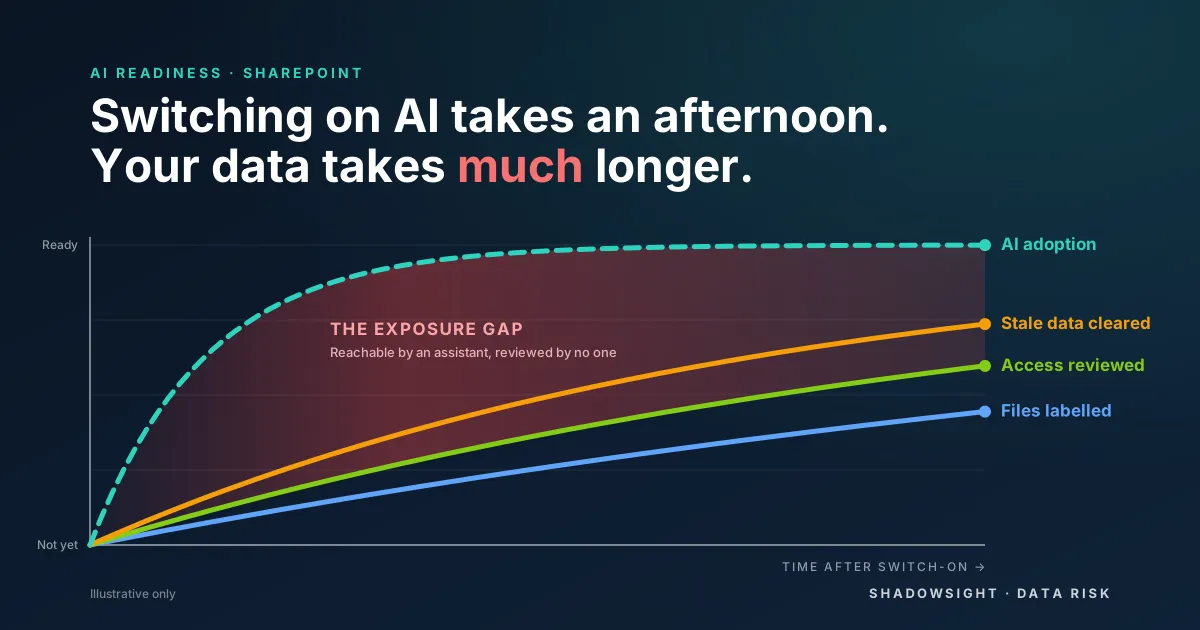
There is a chart doing the rounds among runners that explains why so many of them get injured. When you start training, your fitness climbs fast, and within weeks your muscles have adapted. Your tendons, bones and ligaments take months to catch up. So you feel ready for more than your body can carry, and that is when the injury happens.
Switching on Copilot, or any AI assistant, follows the same curve. The switch-on is the fast part. The things that have to carry the load, starting with SharePoint, haven’t moved at all.
The fast curve: switching on AI takes an afternoon
A licence, a rollout email and a short training session, and your people are getting answers in seconds that once took an hour of digging. Productivity climbs and the business feels fit.
But an AI assistant doesn’t bring its own data. It answers from whatever the person asking can already open. Copilot doesn’t create access to your files. It exposes the access that is already there, and it makes that access effortless to use. The speed of adoption is set by a licence. The safety of adoption is set by years of SharePoint decisions.
The slow curve: what hasn’t adapted
Your SharePoint estate is the tendons and ligaments of the business: built slowly, rarely examined, and now carrying a load nobody designed it for. Four things tend to be hiding in there.
Old, sensitive data nobody remembers keeping. Payroll exports, onboarding packs full of tax file numbers, patient referrals, a recruitment folder whose creator left years ago. It was easy to forget about while nobody could find it.
Access nobody knows they have. Years of “share with everyone” links and all-staff groups mean people hold access they never asked for and never noticed. Obscurity used to protect that data, because no one browses dozens of libraries looking for the payroll folder. A prompt like “show me the disciplinary files” removes that protection in seconds.
Content that is stale and out of date. Superseded policies, last year’s pricing, five drafts of the same contract. Nothing in the library marks them as superseded.
Conclusions built on the wrong answer. An assistant can summarise a 2017 policy as fluently as this year’s. Someone asks a question, gets a confident answer and acts on it. An exposure problem becomes a decision-quality problem, and it is harder to spot because the answer reads so well.
The slow curve in numbers
We built our AI readiness report to make this visible. The sample uses a fictional health organisation, Coralbay Health, but the patterns are the ones a real assessment looks for:
- 96,240 files held sensitive personal information, and 62,480 of them sat in places open to far more people than needed.
- One patient correspondence library was open to all 880 staff, and was also shared by a link anyone in the organisation could open.
- 31% of the sensitive files hadn’t been touched in seven years.
- Only 18% carried a sensitivity label.
The verdict was blunt: not ready. Exposure on its own is not a data breach. It is what turns one AI question into a reportable breach.
Strengthening the slow tissue
Here is the encouraging part. Unlike a tendon, a SharePoint estate can be strengthened in days, not months. In the sample report, three access changes clear 62,480 of the 96,240 sensitive files: removing all-staff access from six libraries and folders, limiting one folder to the people who actually work in it, and making visible who can open two private sites. Together that is about two hours of work for a SharePoint admin and a few site owners. The remaining files then go to their owners as everyday decisions.
Then keep it fixed. Turn off company-wide sharing links by default, label sensitive files, make sure every site has an owner who still works there, and archive what hasn’t been touched in years once retention rules and legal holds are checked. Less old data means less for an assistant to find, and less to pay for. We typically find that 40% or more of SharePoint content is redundant, obsolete or trivial, and clearing it can cut storage cost by around 20%. Those are typical results; an assessment gives you the figure for your own tenant.
Pace the build
Good coaches don’t tell you to stop training. They tell you to build in the right order. The same goes for AI: see what you hold, see who can reach it, fix the biggest exposures, then let adoption run.
That is what ShadowSight Data Risk does. It finds and classifies sensitive data across SharePoint, Teams, OneDrive, Exchange and file servers, maps who can really reach it, corrects Purview labels, and gives you a defensible delete, archive, migrate or fix-access plan for every location. It is read-only, needs no E5 licensing, and works as well after switch-on as before it. Our Data Footprint Assessment starts with a 30-minute scoping call and gives you a first footprint estimate inside a fortnight.
Which leaves a question worth putting to your own leadership team. If Copilot is already on, who can tell you what it can reach? And if it isn’t, what would it find on day one?